
At bitcrowd we love working with PDFs! We even made ourselves famous in the Elixir ecosystem in the past years. One reason is that PDFs have a notable bad reputation, and we are convinced that they donʼt have to.
The problem
One of our client provides generated, dynamic, potentially large, watermarked PDFs to their users. The PDF content is generated based on rich text content stored in the database, that is assembled into HTML. A small JavaScript snippet runs on the generated HTML to add a watermark to each page. The rendered data is then given to Ferrum PDF to generate the actual PDF file.

Letʼs look at the weaknesses of this flow:
-
First of all, the requests are processed synchronously and the PDF is generated in memory. A malicious user, or - truly - just your regular impatient user, can bring down the server by nervously clicking on the download button X times in a row 💥.
-
Additionally, large PDF generation (around 100 pages) can take between 2 to 5 minutes. In the age of doom-scrolling, 5 minutes are not acceptable for your average user. If they close their browser, we have successfully used server resources to generate a PDF that no one will receive.
Embracing asynchronicity
To solve the first problem, we need to track that a user requested a PDF. This way, if they are late for their train and hit the button 10 times, we do not generate the PDF 10 times, just once. We introduce a new model in our database, that links a user with an Active Storage attachment.
class PDFRequest < ApplicationRecord
  belongs_to :user
  belongs_to :resource # The resource is the model containing the rich-text content for the PDF
  has_one_attached :document, dependent: :purge
end
The user is redirected to a page showing the status of the PDFRequest that was created, and a small JavaScript snippet refreshes the page regularly. Once an attachment is present on the PDFRequest record, the download starts. This naturally calls for an asynchronous processing of the request. Sidekiq jobs to the rescue!
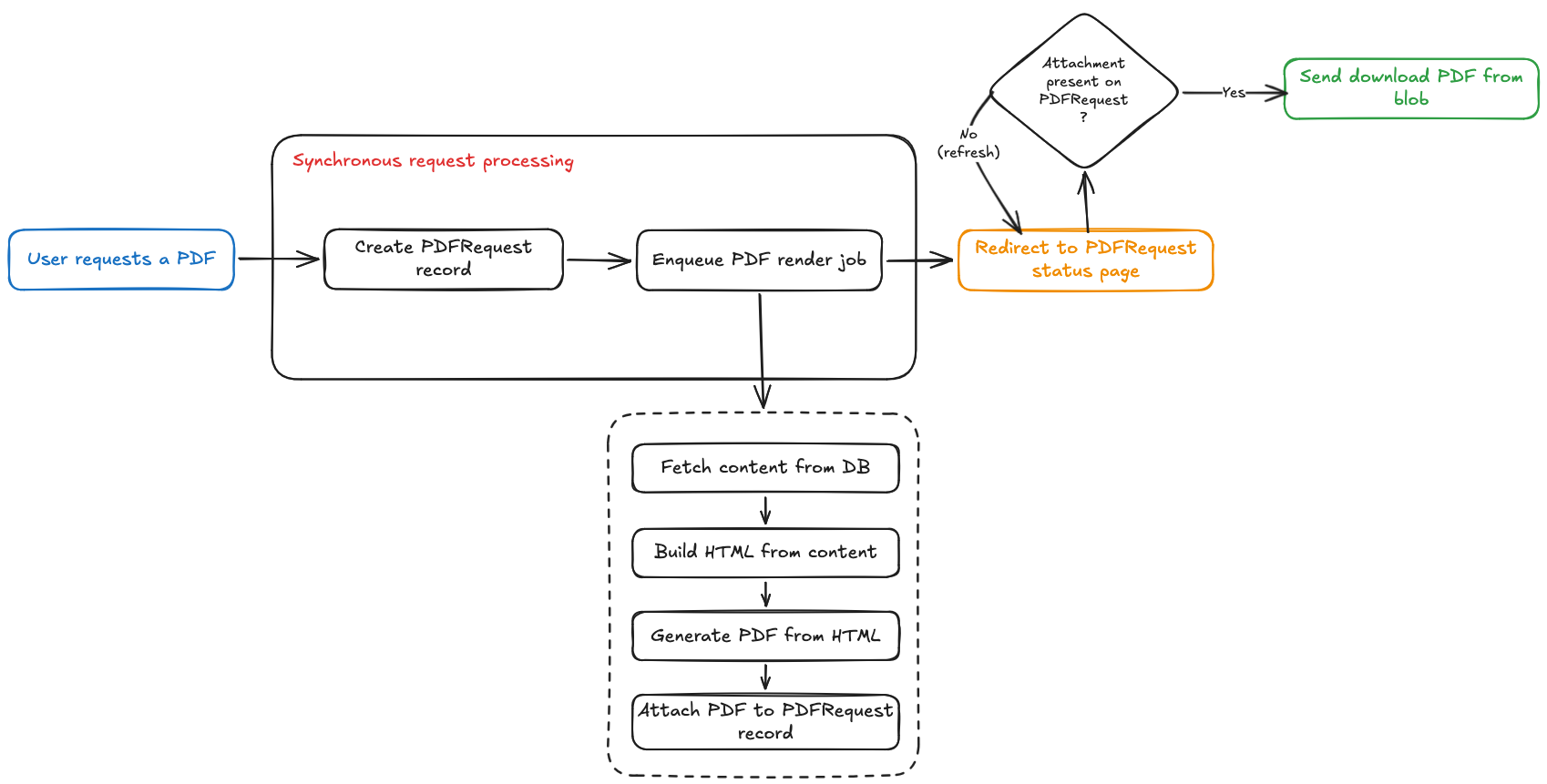
This already has some benefits:
- We prevent crashing the server as the PDF rendering is done asynchronously (we control the amount of parallel jobs in the queue).
- If a user closes their browser, then reopens it later and asks for the PDF again, we redirect them to the existing
PDFRequest. No waiting time, the PDF was already generated and is ready to be downloaded.
But the actual rendering of the PDF can still take some minutes. If many users are asking for a PDF, their waiting time can add up as they could be last in the job queue!
Hash it! Cache it!
One thing we did not mention so far is a characteristic of the PDF files that we generate. This is specific to our client: they can look identical for two different users. If the upstream resource changes, the PDF should change as well. But as long as this resource does not change, meaning the rich-text content does not change, we could save some time re-using an existing PDF. As long as we know that it did not change!
A classic, standard way to do this is by hashing the file. But in our case, we do not take the risk of hashing the PDF itself, since we cannot be sure if that gives a deterministic output. Instead, we hash the HTML output which should be deterministic: we are pretty confident that the HTML generated from the same content should look identical.
Our Sidekiq job can also be updated to follow this flow:
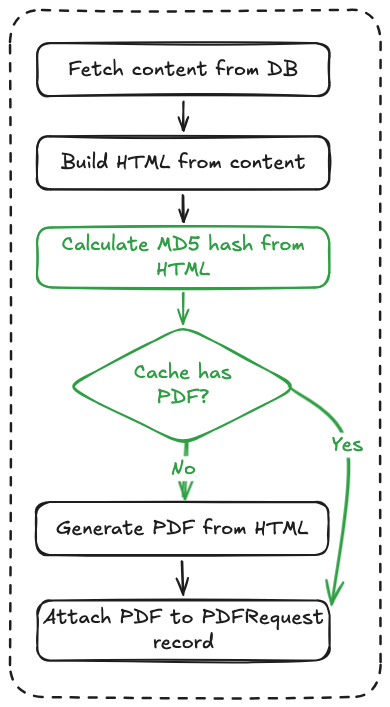
Hereʼs more gold: no need to store the HTML checksum in the database! The generated PDF can be stored in a cache, with the hash checksum as its key in the store. We can then rewrite the rendering code like so:
def render_pdf
  html_checksum = Digest::MD5.hexdigest(html)
  Cache.file_cache.fetch("pdfs/#{resource.id}/#{html_checksum}", expires_in: 1.day) do
    FerrumPdf.render_pdf(
      html: html,
      pdf_options: {
        format: :A4,
        scale: 1.0,
        ...
      }
    )
  end
end
This has great benefits:
- The PDF does not need to be generated for each (user, resource) pair, but only once. The first user to request a PDF for the resource will wait, but everyone else after them will not (until something changes on the resource).
- Using the hash approach preserves us from two other approaches:
- Hook on any change made to the resource. While this could be a viable option, in our case the “resource” is actually a very complex entity relationship model and tracking changes made to associated models would be hell.
- We are not fans of database triggers for this use case because they are rather invisible from the codebase perspective.
- Moreover: while these two other approaches operate on the content, the hash approach operates on the generated HTML. This gives us something extra: if we change the CSS, JavaScript, or the HTML layout (literally anything listed in the HTML output) used to render the PDF, the computed hash would change. In other words, we get a neat and clean cache invalidation: in case the content changes or in case the looks of the PDF changes, the cache would not be hit, and we would re-render a fresh PDF.
Note that for this to work, you need to make sure the HTML output is deterministic. This means for example that you cannot have random IDs in the DOM.
Wanna see me run to that mountain and back?1
At this stage, the PDF rendering is already much better. It runs asynchronously and leverages the redundancy of identical HTML outputs. But we can do more. The first user to request a PDF for a resource that is not cached yet still needs to wait 2-5 minutes to get the PDF. In our case, the same sections can be rendered for different users across resources, so we could actually cache parts of the HTML.
Rails Fragment Caching to the rescue!
- resource.sections.each do |section|
  - cache section do
    = react_component 'RichContentViewer', props: { content: section.content }, id: "rich-content-#{section.id}"
This is just given by Rails, and we can use it to shorten the rendering time when the PDF is re-generated.
Conclusion
In this article we saw an iterative approach to optimize the rendering of large PDF files in Rails. First by adopting a queue system, then by caching the entire PDF files, and finally by using Rails fragment caching. The rendering time at our client has gone from 2 - 5 minutes down to some seconds! 🎉