
Weʼve been working with the ZLB (Berlinʼs public libraries) to build a social networking platform called “Wiblio” that communities meeting at local libraries can use as their digital home. Since open source was a key requirement of the project, Discourse was chosen as the foundation.
Discourse alone wasnʼt enough — we needed a few major customizations to bring Wiblioʼs functionality and design to life. In this post, Iʼll walk through how we approached customizing Discourse so far, and the challenges we ran into along the way.
➡️ Learn more about the project at the case study on bitcrowd.net
What is Discourse?
Discourse is an open source internet forum system built with a Ruby on Rails backend and an Ember frontend. It already comes with a lot of functionality and preinstalled plugins, like chat, calendar, events, and more. Discourse is built around the idea of being customizable. Customizations are possible via multiple layers:
- Admin settings. Discourse exposes a surprising amount of behaviour through admin settings. Some examples: chat as overlay vs. fullscreen, calendars on category pages, fine-grained access rights, and so on.
- Plugins. Plugins can change backend behaviour and the frontend. Examples: Discourse Calendar and Discourse Chat
- Themes and theme components. These customize the frontend with CSS and JavaScript.
Figuring out what we needed to build
Discourse has a massive codebase and can be customized in many ways through its settings. One important task we worked on together with the ZLB people was to identify which features could already be enabled simply by adjusting these settings. We also researched existing plugins to find out whether maybe a feature we needed was already implemented and available.
This was already quite some work and a question we asked ourselves regularly was: “Could we just solve this using some admin, site, or access right settings instead of implementing something new?” When a setting or existing feature was enough, we saved implementation and maintenance effort, important for the MVP. It’s also less likely that something breaks on core updates to Discourse.
In the end, three areas required custom work:
- Allowing users to use the platform even without confirming their email address, and the extra security measurements needed to safely enable that.
- Adding features that make the user feel like they are moving in their chosen community and not a general forum with all users.
- Building a custom Wiblio theme.
Implementing the changes
It became clear that the easy-access (1) and community (2) requirements were independent. So we decided to create a new plugin for each of them. As the plugins in the long run should be usable by others, this design choice also had the benefit that the use of the plugins is more flexible: Discourse instances might use only one or the other and should still work fine.
The plugins
Implementing a plugin that in some way changes the core Discourse behaviour is a balancing act where you are trying to make sure the changes are in place, but in a way that is not too invasive or too fragile under core updates.
To adjust backend behaviour, Discourse provides a range of helpers, like event hooks, modifiers, and more. When those helpers are not enough, the last resort was to override an existing Discourse method.
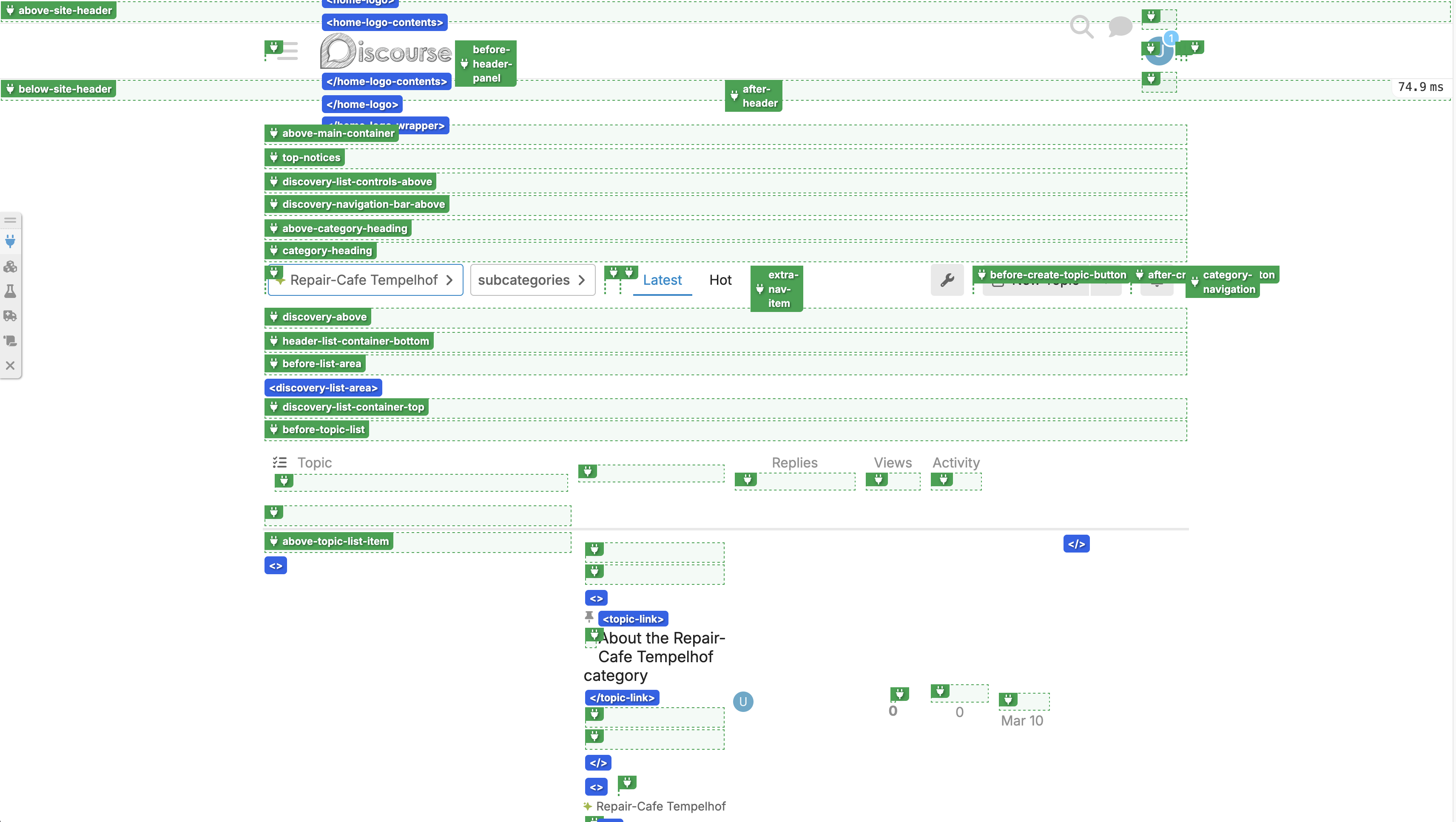
To add an element to the UI, Discourse provides “Plugin Outlets”. These act as named slots in the DOM where a plugin can render its own content.
In the image below you can see the Plugin Outlets on the category show page. Each green box represents one outlet. So for example we used the above-main-container outlet to render a custom header component on most of the pages.
One thing we learned: building a brand-new page that the plugin fully controls was generally a lot easier than doing complex overrides for an existing page. We could still reuse Discourseʼs components and logic, but have full control under which conditions they are shown and what else we display on the page.
Adding new components in a plugin
For the community plugin we added a full new “Dashboard” page that required several new components: a header, a card and a card button component.
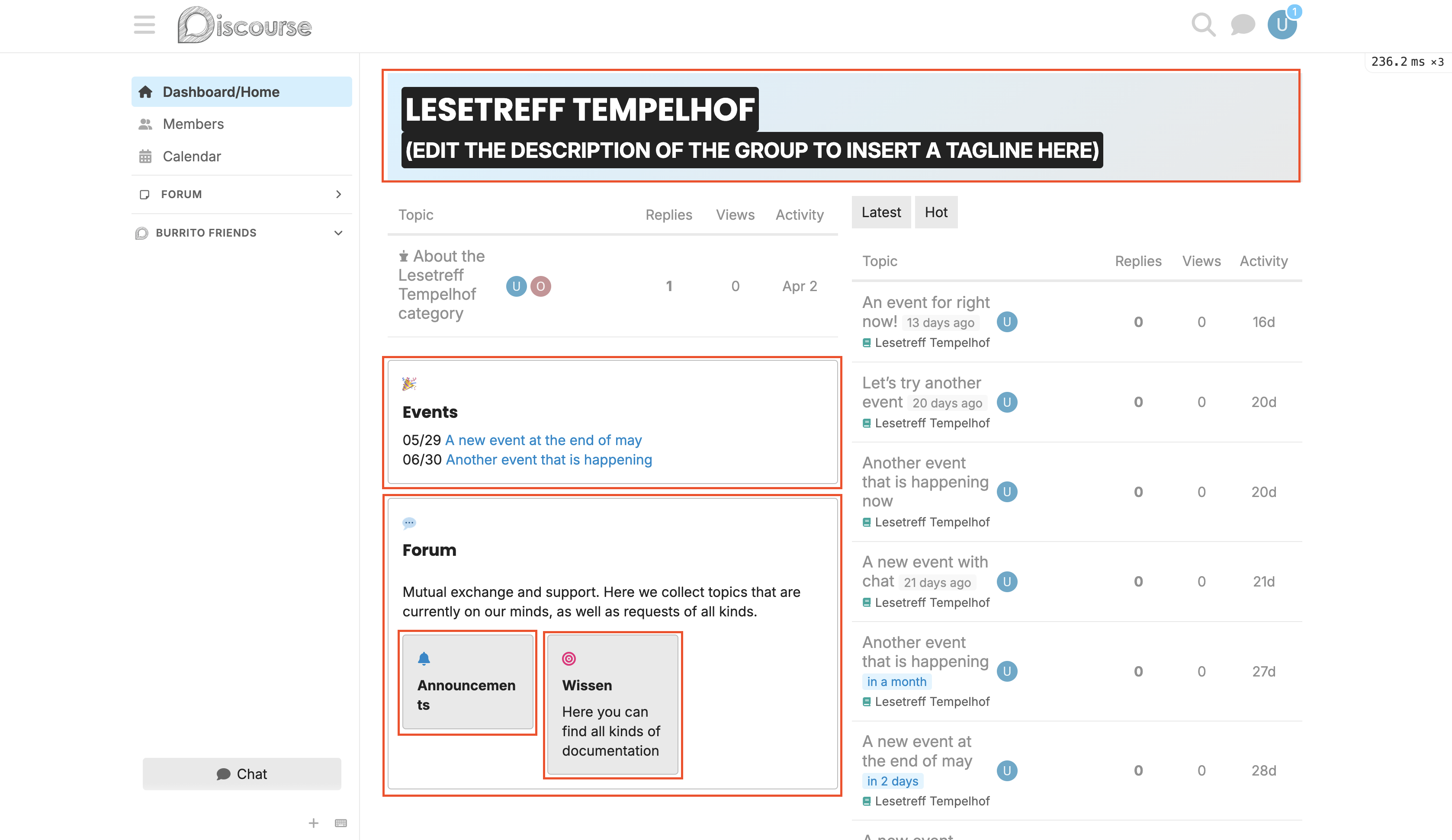
We wanted these components to be themeable, but to also look good out of the box if a theme didnʼt restyle them.
To achieve this, we built a structured set of components following the atomic design architecture that Discourse uses, using Discourseʼs built-in components as much as possible. Each component was built with sensible CSS defaults, and exposed CSS variables to be overridden in the theme. Additionally, we attached classnames to the components and many of their elements to allow rich customisation.
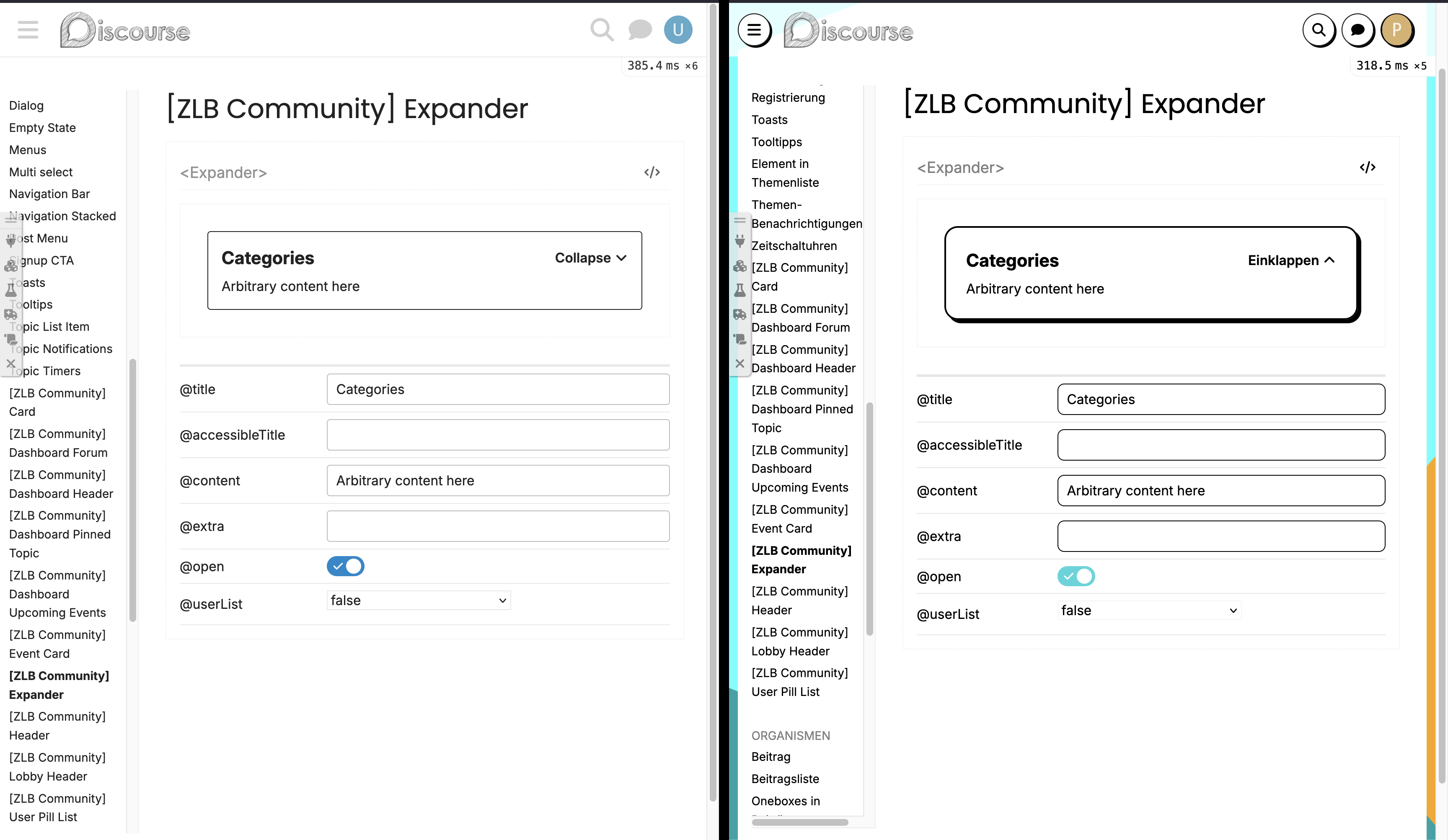
We used the Styleguide plugin that’s recently been made core to discourse, to provide an isolated environment where we could implement our new components. For the new dashboard components, this meant we added new sections for the header, the card, and the card button component, as well as for the composite components such as the forum card and upcoming events card.
The theme
The themeʼs job was to realize the visual design on top of everything the plugins and Discourse core provided. We worked with a colleague from the ZLB to extract the design tokens from the designs and implement them in the theme as a two-tiered system of CSS variables.
The Styleguide plugin made this much easier: separated from the functionality and state of the main app, we render the real components in every state and variant that’s needed, where they can be compared directly to designs. This is a great dev environment, leading to quicker and more consistent implementation, and allows the user interface components to be QAd independently of the rest of the work.
Wrapping up
Wiblio was pre-released at re:publica 2026 🎉. But itʼs not fully live yet — so this post is more “notes from along the way” than a retrospective.
In this project, we focused on reusability: making sure every part we built could be reused on another Discourse instance: splitting features into independent plugins, building on Discourseʼs own components, exposing CSS variables, documenting each component in the Styleguide.
We also learned that “customizing Discourse” can mean a lot of different things — each new feature has been its own little judgement call between “use a setting”, “write a plugin”, or “tweak the theme”. We might revisit some decisions. Whatʼs worked for us so far is staying as close to Discourseʼs built-in extension points as we can, and accepting a new dedicated page over a fragile override whenever thatʼs an option.