
We recently revived an old client project at bitcrowd and decided to dockerize it and deploy it with Kubernetes. Sadly, our AppSignal deploy markers were not being sent. In this blog post we will see how to send these deploy markers, and more importantly, how to find out what the problem is.
Deploy markers?
A deploy marker indicates a change in the deployed version of an application.
AppSignal tracks your deploys with deploy markers. They can be seen in the “Deploys” section of their app. They are a great way to document deployments, but also errors reported by AppSignal are then associated to a certain deployment. Additionally our team receives a Slack notification when a new version of our code was released to staging or production.
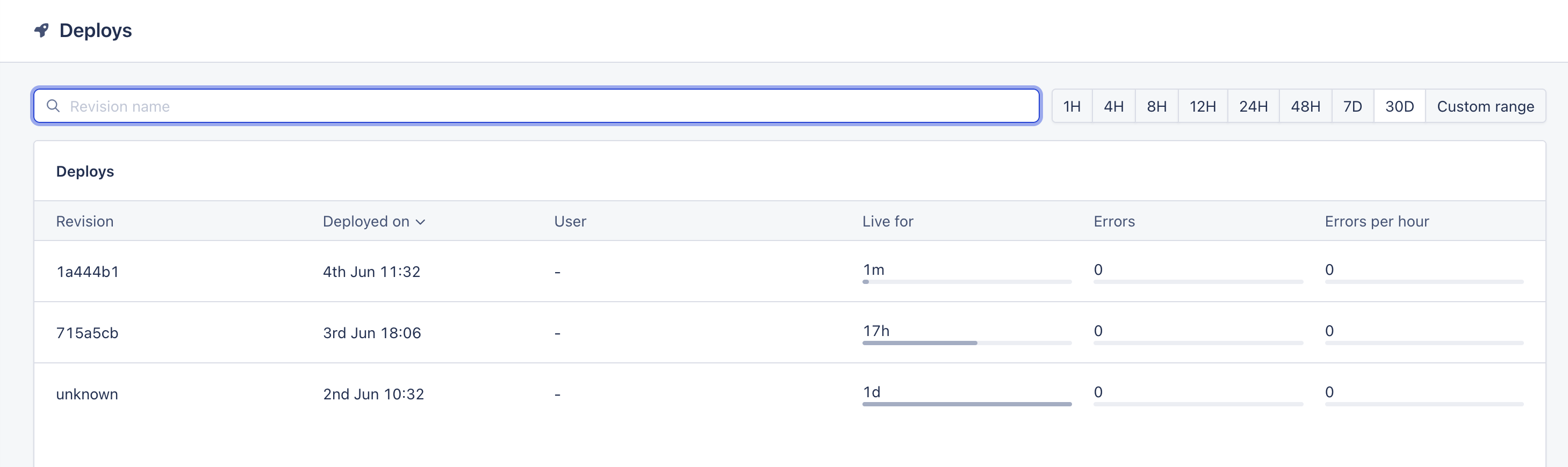
In short: deploy markers in AppSignal are valuable. And they can be even more valuable when one assigns a meaningful value to the deployʼs revision. Traditionally, such a meaningful value is the short SHA of the last commit in the release. That way, a developer knows exactly what code this release was running on.
AppSignalʼs agent sends the deploy markers via their API when it detects that the environment variable APP_REVISION has changed on the server. This is a first clue to our problem!
APP_REVISION, are you there? 🔮
A first look at the container environment variables tells us that no, there is no such variable on the server. Hereʼs how to inspect those variables:
kubectl exec -it [pod] -n [namespace] -- env
We need to set this variable somehow, ideally programmatically, to the SHA of the last commit in the release. The release is built with Docker in our Github CI, and pushed to our container registry. The CI would be a natural place to set this environment variable.
Here, with a Github action:
- name: Get short SHA
  id: sha
  run: echo "short=$(git rev-parse --short HEAD)" >> $GITHUB_OUTPUT
- name: Build and push Docker image
  uses: docker/build-push-action@v7
  with:
    ...
    build-args: |
       COMMIT=${{ steps.sha.outputs.short }}
The build-args section in this action functions in the same way as the docker flag: docker build --build-arg COMMIT="foo".
Then, in our Dockerfile:
ARG COMMIT
ENV APP_REVISION=$COMMIT
RUN echo "APP_REVISION=$APP_REVISION"
And there we have it, when building the image in the CI and looking at the logs, we see that APP_REVISION is properly assigned the SHA of the last commit!
APP_REVISION pongs 🏓
A piece of knowledge to have in mind: the environment variables of the container image are “merged” into the container environment variables. So, if APP_REVISION is set in the image, we should see it listed in the container with our env command kubectl exec -it [pod] -n [namespace] -- env.
If itʼs still not set, make sure the ARG and ENV declarations in the Dockerfile are done on the last stage - for multi-stage Docker builds (in other words: after the last FROM clause).
At this stage we do have APP_REVISION set, but we still did not get our deploy marker! Whatʼs going on?
AppSignal agent config
There is one way to debug this, and it is to look at AppSignalʼs agent log on the server. This can be done with:
kubectl exec -it [pod] -n [namespace] -- cat /tmp/appsignal.log

[2026-06-03T14:46:20 (process) #8][INFO] Starting AppSignal
[2026-06-03T14:46:20 (agent) #16][Info] Started appsignal-agent 0.36.9 (build 68764aa)
(as 0/0) with config Config {
active: true, agent_path: None, agent_standalone: false,
app_name: Some("foo"), app_path: Some("/app"), app_revision: Some("715a5cb"),
...
environment: "staging",
push_api_endpoint: Url { host: Some(Domain("push.appsignal.com")), ... },
push_api_key: "****",  working_dir_path: "/tmp/appsignal",
...
}
From this config, one can verify that the AppSignal agent has picked up the correct app_revision. We can also verify that we have the correct environment configured, and the correct push_api_key.
We found out that the push_api_key was set to our AppSignal organization API Key. Instead, it should be the API Key specific to the given application on AppSignal, for that environment.
We changed the value, rolled out a new release, and there we had it, our first deploy marker! Job done 🪇.