
On a recent client project, redesigning a large Rails app, we found ourselves having to get Rails, Hotwire's Turbo and React on Rails to play together nicely. Each of the tools comes with its own amounts of magic™, so integrating them turned out to be a bit of a juggle.
Scenario
On this project, we were implementing the new design for a particular page. At it's core, it shows two lists, each with a "Load More" button to asynchronously fetch and append more items to it. The first list is just a stack of items, the second one also includes a grouping of the items. Imagine it roughly like this:
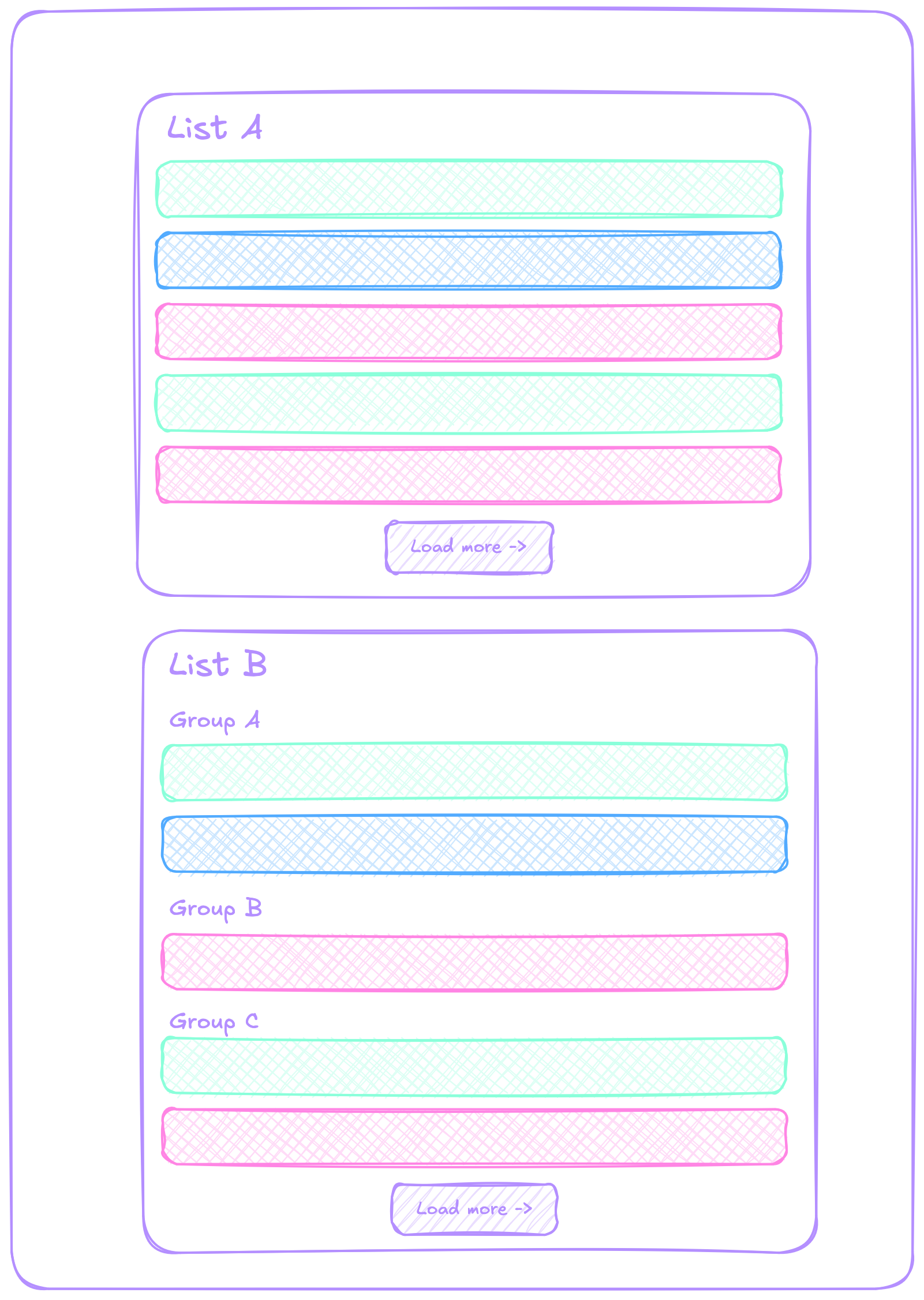
In "List A", clicking "Load More" should append another batch of 5 items to the bottom of the list until the bitter end. For "List B", clicking "Load More" should also append another batch of 5 items, where some may still belong to "Group C" and others will form new groups, each with their respective group header. The list items are heterogeneous and contain complex markup with graphics, etc.
Pagination
We decided to implement the pagination logic using Turbo Streams, as they seem to be a good fit for our use case. They also integrate nicely into the Rails ecosystem without being too tightly coupled (e.g. to a specific version of Rails). From Rails 7 on, Turbo also replaced Rails' UJS (Unobtrusive JavaScript) functionality and is the recommended tool for sprinkling asynchrony and SPA (Single Page Application)-feelings. From the Turbo Stream docs:
Turbo Streams deliver page changes as fragments of HTML wrapped in
<turbo-stream>elements. Each stream element specifies an action together with a target ID to declare what should happen to the HTML inside it. These elements can be delivered to the browser synchronously as a classic HTTP response, or asynchronously […]
And further on:
They can be used to surgically update the DOM after a user action such as removing an element from a list without reloading the whole page […]
This sounds like a match for what we are doing!
By having our server respond with turbo_stream templates for the pagination requests, we are able to use the same View Components and partials we already have in place from the initial server-rendered page. This is important to us because we're already using our component library throughout the whole project. Reimplementing the same components in a different framework or language just for this single page would be unnecessary duplication, not to mention the constant risk of the two implementations diverging.
Example
For the sake of simplicity, let's focus on the first list, "List A". The initially rendered page would have a markup like this for the list:
<h2>List A</h2>
<ul id="list-a">
  <li><abc-item/></li>
  <li><abc-item/></li>
  <li><abc-item/></li>
  <li><abc-item/></li>
  <li><abc-item/></li>
</ul>
<turbo-frame id="load-more-a">
  <load-more-button/>
</turbo-frame>
<!-- ... -->
When the user clicks the "Load More" button, we want to retrieve the next batch of items, append them to the list and replace the button with one to request the next batch. If there is no next batch of items, we remove the "Load More button.
In the controller taking care of the pagination request, we can render a response template of the format turbo_stream. A simplified version could look like this:
<%= turbo_stream.append 'list-a' do %> <%= render
AbcItem.with_collection(@items, as: :item) %> <% end %> <% if @pagy.next %> <%=
turbo_stream.replace 'load-more-a', method: :morph do %>
<turbo-frame id="load-more-a">
  <%= render LoadMoreButton.new(path: '/', params: { page: @pagy.next }) %>
</turbo-frame>
<% end %> <% else %> <%= turbo_stream.remove 'load-more-a' %> <% end %>
Note that the example is View Components and the pagy pagination library. In the template, we're appending items to "List A" and replace the "Load More" button with a new one. If there aren't any items left the "Load More" button gets removed.
The response from the server would then look roughly like this:
<turbo-stream action="append" target="list-a">
  <template>
    <li><abc-item/></li>
  </template>
</turbo-stream>
<turbo-stream action="remove" target="load-more-a">
</turbo-stream>
It appends one item to the list and removes the button to load more.
Problem
Our <abc-item/> element contains a React component, MyComponent in its markup, rendered via React on Rails' react_component helper. In the final HTML those React components appear as three elements each. Two script tags with context and props and one wrapper element for the rendered HTML of the component:
<script type="application/json" id="js-react-on-rails-context">
  …
</script>
<div id="MyComponent-react-component-eaca5b56-0732-4674-b9da-f858c224d410">
  <!-- MyComponent markup -->
</div>
<script
  type="application/json"
  class="js-react-on-rails-component"
  data-component-name="MyComponent"
  data-trace="true"
  data-dom-id="MyComponent-react-component-eaca5b56-0732-4674-b9da-f858c224d410"
>
  …
</script>
For any <abc-item/> element added to the page via Turbo Streams, those three elements are also added to the DOM, but the wrapping <div> stayed empty: the component wasn't actually mounted! 🙀
<script type="application/json" id="js-react-on-rails-context">
  …
</script>
<div
  id="MyComponent-react-component-eaca5b56-0732-4674-b9da-f858c224d410"
></div>
<script
  type="application/json"
  class="js-react-on-rails-component"
  data-component-name="MyComponent"
  data-trace="true"
  data-dom-id="MyComponent-react-component-eaca5b56-0732-4674-b9da-f858c224d410"
>
  …
</script>
Turbo is injecting markup into the already fully rendered page and none of the DOM events React on Rails is hooking into to execute the JavaScript to mount React components on the page are being fired.
Options
React on Rails already has support for Turbo Streams, but only as part of their paid pro plan. Going "pro" wasn't an option for the project as they are on a tight budget and only using small parts of React on Rails in isolated areas of their app. So we're not really qualifying for "pro" here…
Server-side rendering the React components would also have been an option to tackle the problem. But this again was out of scope for our project and we did not want to run JavaScript on the server.
So what now?
JS to the rescue
With the help of some AI coding agents, we explored the internals of the react-on-rails and @hotwired/turbo-rails NPM package to see what was actually happening. The rough idea was that, if any events were emitted by Turbo when Stream elements were injected and rendered, we could hook into them and then manually call React on Rails to mount all the newly inserted components on the page.
In Turbo, we found the StreamElement. It has a render function and a target pointing to the ID of the DOM-element it's rendered to. Combining these two things, the plan was to extend the render function to also take care of mounting any React elements within the updated target element. This means, when the StreamElement contained any React components, we want to make sure they are correctly mounted after the rendering of the StreamElement itself was done.
/**
 * Gets the current target (an element ID) to which the result will
 * be rendered.
 */
get target() {
  return this.getAttribute("target")
}
So we wrote our own tiny JS module to patch Turbo with some additional logic for our React on Rails integration:
// First we get hold of the original render function of Turbo's StreamElement
const originalRender = Turbo.StreamElement.prototype.render;

// Then we override it to extend it with our own additional logic:
Turbo.StreamElement.prototype.render = function () {
  // First we call the original render function
  originalRender.call(this);

  // Then we get hold of the target element
  const target = document.getElementById(this.getAttribute("target"));

  // Then we wait for the next frame, to make sure that the DOM is fully loaded
  // and we call a function to have React on Rails mount all components within
  // the newly inserted DOM snippet.
  if (target) {
    requestAnimationFrame(() => mountReactOnRailsComponents(target));
  }
};
The custom mountReactOnRailsComponents function is pretty much a manual re-implementation of what's happening when React on Rails is client-side rendering components:
function mountReactOnRailsComponents(domNode) {
  domNode
    // First we get all React on Rails components within our node
    .querySelectorAll("script.js-react-on-rails-component")
    .forEach((script) => {
      // Next we get the name of the component and the DOM ID of the placeholder
      const name = script.dataset.componentName;
      const { domId } = script.dataset;
      const shouldHydrate = script.dataset.hydrate === "true";

      // Then we put together the component props
      let props = {};
      try {
        props = JSON.parse(script.textContent || "{}");
      } catch (error) {
        console.error("ReactOnRails props JSON parse error for", name, error);
        return;
      }

      // Now we need the placeholder element
      const placeholder = document.getElementById(domId);
      if (!placeholder) return;

      // We check whether the component was already mounted
      // in this case we don't want to re-render it.
      const hasMounted = placeholder.dataset.reactOnRailsMounted === "true";
      if (hasMounted) return;

      // Then we call React on Rails' render function to mount the component
      ReactOnRails.render(name, props, domId, shouldHydrate);

      // Finally, we mark the placeholder as mounted, so that we don't accidentally
      // re-render it.
      placeholder.dataset.reactOnRailsMounted = "true";
    });
}
With this in place, our Turbo Streams based pagination works like charm. Any React component newly added to the DOM is mounted as normal 🎉.
Conclusion
Drilling around like this in the internals of Turbo and React on Rails of course yields its risks. Now we're maintaining additional code which may break any time we update our Turbo or React on Rails dependences. But as we're only using the module in a small isolated area of the application, it's a risk we can accept for now. Our test coverage of the feature will inform us early enough.
Using open source technologies, we have the chance to peak under the hood of the tools and can if necessary adapt them to our needs. And working with legacy codebases and legacy Rails apps, their may be situations with unconventional needs…
We hope this post was helpful and inspires you to explore the details of the tools you're using the next time you hit a wall with them. Migrating to an entirely different tool is often a way bigger operation, especially in large monoliths.